%20copy-1.png?width=300&height=80&name=petszel-horizontal%20(3)%20copy-1.png)
Shelter Buddy allows you to manage each adopter’s communication preferences. Petszel uses these settings to determine whether or not to send emails or text messages, ensuring adopters only receive the communications they’ve agreed to.
📩 What Petszel Monitors
-
Email:
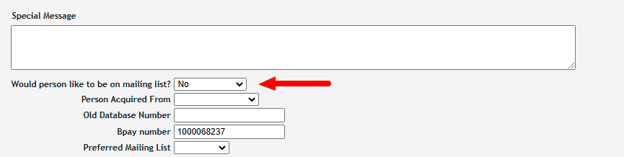
If the "Do Not Mail" box is checked in Shelter Buddy, Petszel will not send emails to that adopter. -
Phone/Text:
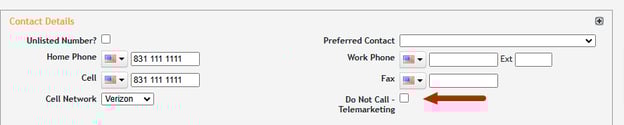
If the "Do Not Call" box is checked, Petszel will not send welcome texts or any other SMS messages.
📝 How to Update Communication Flags in Shelter Buddy
To review or change an adopter’s communication settings in Shelter Buddy:
-
Log in to Shelter Buddy with the appropriate access level.
-
Navigate to the People or Clients/Adopters section.
-
Use the search function to locate the adopter by name, email, or phone number.
-
Click on the adopter’s name to open their record.
-
In the adopter profile, look for the Communication Preferences section.
-
Check or uncheck the relevant boxes:
-
✅ Do Not Mail– Prevents emails from Petszel.
-
✅ Do Not Call– Prevents text messages from Petszel.
-
-
Click Save to update their preferences.
🔄Petszel automatically syncs with these fields at the time of adoption connection, so updates before or during an adoption in ShelterBuddy are reflected in the Petszel platform.