%20copy-1.png?width=300&height=80&name=petszel-horizontal%20(3)%20copy-1.png)
🔹 Step-by-Step Instructions
Step 1: Generate an API key
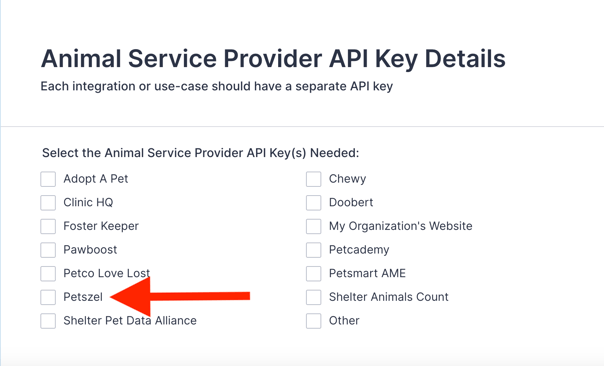
- To generate an API key, reach out to the Shelterluv team through this form. They will email you an API key.
- When completing the form, in the section that asks for "Select the Animal Service Provider API Key(s) Needed:" Select Petszel
✅ Step 2: Submit your API key to Petszel.
- You can do this two ways:
- Input API key in designated box in the onboarding wizard.
-
- Log in to your Petszel dashboard with the username and password you signed up with.
- Go to Integration Settings > Add Integration
-3.png?width=587&height=204&name=hstv%20Logo%20(1)-3.png)
- In the flyout menu, select Shelterluv from the Shelter Management Software dropdown. Enter API key:
- Click Validate. Then Save.
- Go to Integration Settings > Add Integration
- Log in to your Petszel dashboard with the username and password you signed up with.