%20copy-1.png?width=300&height=80&name=petszel-horizontal%20(3)%20copy-1.png)
How Do I Add Local Providers?
Petszel lets shelters and rescues highlight trusted local pet care providers—like veterinarians, groomers, trainers, and more—directly in the Petszel app. These recommendations appear in an interactive Google map view, helping adopters easily find and connect with nearby services.
What you get:
-
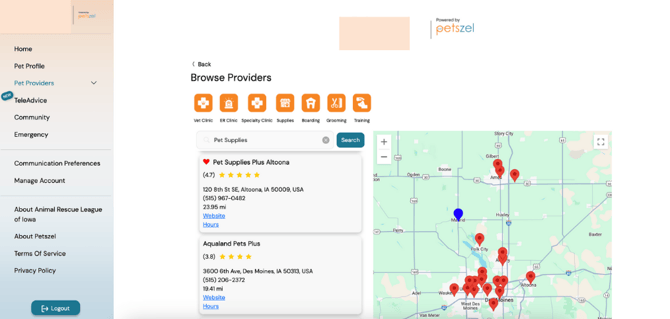
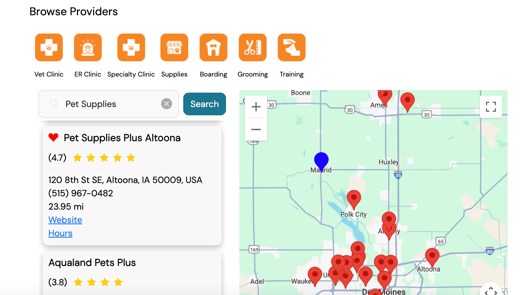
Your added providers will automatically appear in a Google Map view within the adopter’s app. Like this:
-
Each provider pin includes business info, website links, and contact options.
-
Adopters can search by distance or service type to find what’s most relevant.
Adopter View
Step 1: Log into Your Petszel Shelter or Rescue Account
-
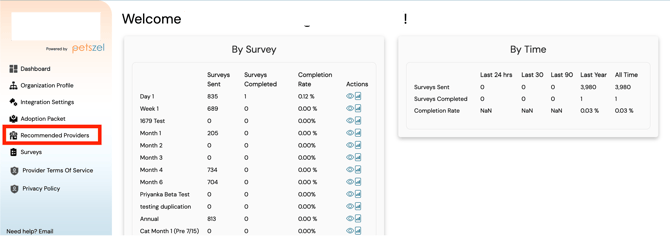
Go to your Shelter Dashboard on Petszel.
-
Click on Recommended Providers in the left-hand menu.
Step 2: Add a New Provider
-
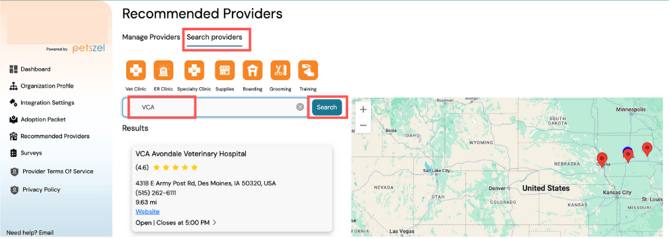
Click on the Search Providers tab and enter the business name in the search box. Click search.
-
If the business has a Google Maps listing it will appear in your search results.
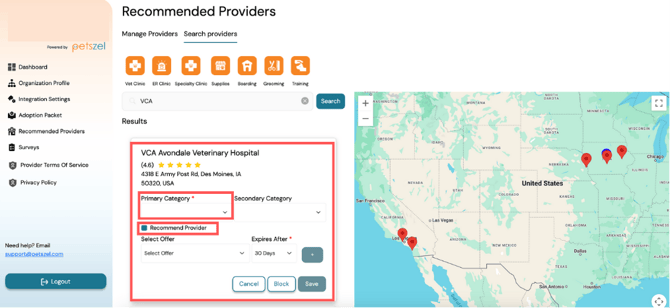
- Click on the listing and assign a category (Vet Practice, Supplies, Groomer, etc)
- Next, assign a category that best describes their service (like Vet Practice, Groomer, Pet Supplies, etc.).
- 💡 You can add a secondary category if the provider offers multiple services (e.g., a vet that also offers training).
-
(optional) Check Recommended Provider. The provider will now appear on the interactive map in your adopters’ app, complete with their location, website, and contact info and will be labeled with a ❤️, like this:
Adopter view
-
(optional) Add an offer.
-
Once you’ve selected the category or categories, just click Save—and that’s it!
💫 You can add multiple providers to give adopters more choices based on their needs and location.
(Optional) Block a Provider
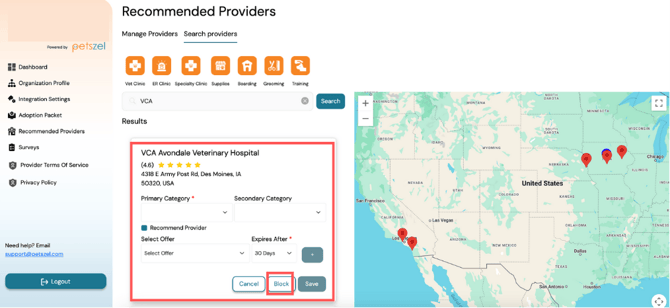
Blocking a provider hides them from all user-facing search results and prevents them from being included in offers. You can unblock them at any time from the same menu.
- Locate the provider in the search and click block button. Select reason for blocking and hit save.
Read more about blocking providers here.
Why Add Local Providers?
-
Helps adopters quickly find reliable, nearby pet care
-
Builds trust by featuring providers you know and recommend
-
Encourages follow-through on care, like vet visits and training sessions
Need help setting up your local provider list? Send us an email. We’re happy to walk you through it. 🐶💼