%20copy-1.png?width=300&height=80&name=petszel-horizontal%20(3)%20copy-1.png)
Blocking a provider is a useful way to remove them from all user-facing experiences. Blocked providers won’t appear in search results and can’t be included in any offers until they’re unblocked.
When to Block a Provider
You might block a provider if:
-
They do not use positive reinforcement methods
-
Have a history of poor service or bad reputation
-
Are under formal investigation for animal welfare concerns
-
They source animals in a way not aligned with your mission
Blocking is reversible, so you can reinstate them at any time. Note: Any offers associated with the blocked provider will be removed.
What Happens When a Provider is Blocked?
-
They are removed from all user-facing search results
-
They will not be eligible for built-in or custom offers.
-
Their profile remains in your shelter-facing dashboard for internal reference
How to Block a Provider
-
On the Recommended Providers tab in your dashboard, search for the provider you'd like to block using their name or other filters.
-
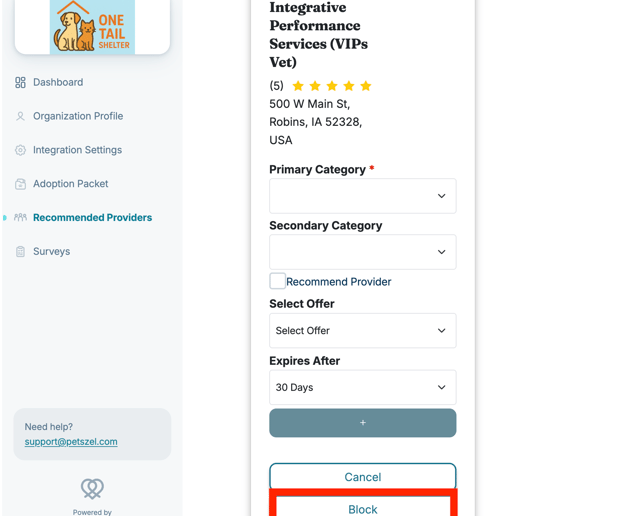
Click into the listing. This will reveal the Block button. Select the Block button in the bottom-right corner.
-
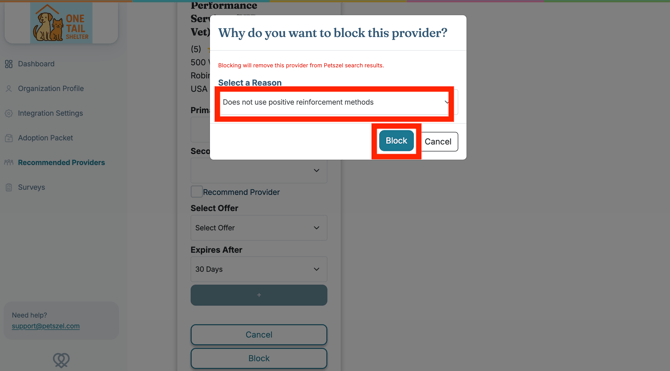
Choose a reason from the dropdown (does not use positive reinforcement methods, has a history of poor service or bad reputation, under formal investigation for animal welfare concerns, sources animals in a way not aligned with our mission). Click Block.
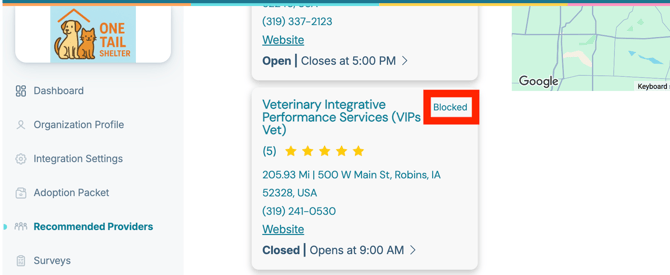
That’s it! The provider is now blocked from user access. You can see this in the upper right hand corner:
Blocked tab
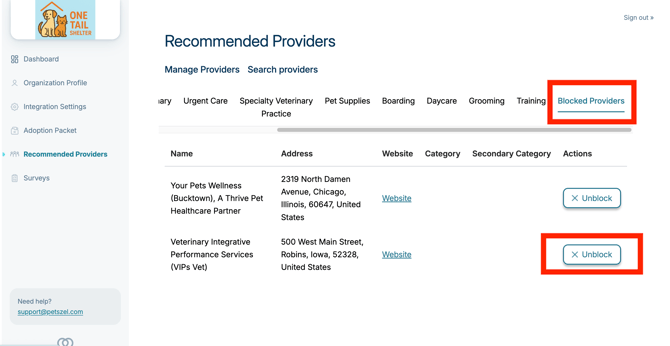
- Navigate to Recommended Providers tab. Locate Blocked Providers, which is the last sub-tab.
- Click Unblock. Confirm Unblock in the pop-out.