%20copy-1.png?width=300&height=80&name=petszel-horizontal%20(3)%20copy-1.png)
Chameleon’s client consent system is highly configurable, allowing shelters to tailor consent tracking to their specific workflows. Petszel supports standard consent logic and integrates with shelter-defined configurations.
Please review the guidance below to understand what’s currently supported in Petszel. If your shelter uses a different setup, reach out to support@petszel.com to schedule a configuration review.
✅ Person-Level Partner Consent Using Extra Flags (Best Practice)
To track adopter consent for specific reporting partners, we recommend using extra flags on the Person record in Chameleon.
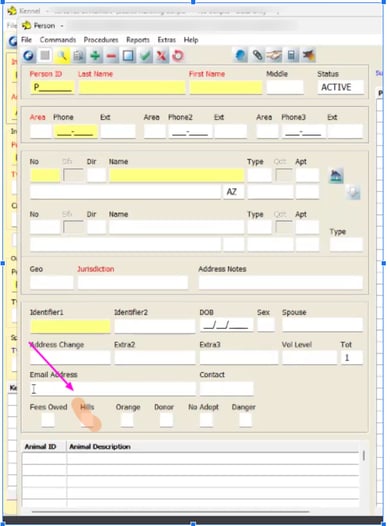
Here’s how it works:
-
Each partner is assigned a specific
PERSON.EXTRA#field (e.g.,EXTRA5,EXTRA6) in Chameleon. -
If the box is checked, this indicates the adopter has opted in, and their data will be included in partner reporting via Petszel.
-
If the box is unchecked, the adopter will be excluded from any Petszel data shared with the associated partner.
🔄 Alternate Workflow: Kennel-Level Partner Consent
Some organizations choose to manage adopter consent at the kennel level, especially when coordinating with multiple third-party partners such as Hill’s or Boehringer Ingelheim. This approach allows consent settings to be tied directly to the animal’s kennel or housing location.
NOTE: Petszel Post Adoption opt-in iscontrolled by the Contact field and not the Extra fields. Extra fields cannot be used for opt-in to our Post Adoption product.
How It Works
A KENNEL.EXTRA# field is used to capture opt-in status for each partner. This field can be configured to reflect the following values:
| Kennel Extra Field Value | Consent Status | Petszel Behavior |
|---|---|---|
Yes |
Opted in | share = true |
Unknown |
No confirmed opt-in | share = null |
No |
Opted out | share = false |
🧩 During Onboarding
During the Petszel onboarding, please confirm if you are using fields on Person or Kennel Level:
-
Which
PERSON.EXTRA#field is used for each of your partners.- Currently we only monitor Extra#1 for Hills
- Please include screen shots
-
Which
KENNEL.EXTRA#field is used for each of your partners- Currently we only monitor Extra#5 for General (All Partner Opt-In)
- Please include screen shots
-
Confirm the value mapping (
Yes,Unknown,No) aligns with your shelter’s intended consent logic
This ensures accurate consent handling and reporting from day one.
📞 Need Help?
Please contact support@petszel.com for help.