%20copy-1.png?width=300&height=80&name=petszel-horizontal%20(3)%20copy-1.png)
This article applies to shelters integrating with Petszel to automate Hill’s Food, Shelter, Love reporting.
Why this matters
Before Petszel can send your adoption data to Hill’s automatically, you must (1) prove you’re authorized by Hill’s and (2) tell us how your adopters grant marketing consent. Completing these two steps unlocks the Partner API for hands-free, compliant data sharing.
Before starting
Before starting the Hill's validation process, you must have validated and connected Petszel to your animal management software. Your integration must be marked "working" in green. This will unlock the Partner API tab to validate your credentials.
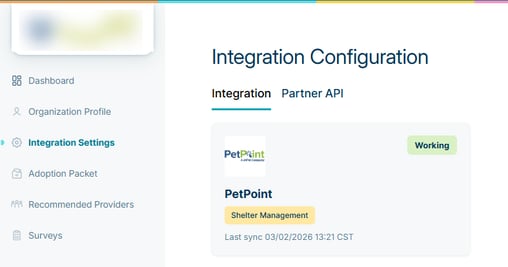
Integration Statuses and what they mean:
- New-Pending: If your integration status is New-Pending, you may have to wait for the Petszel team to notify you that your data is synching. If you have questions about this status, please reach out to the Petszel Support Team at support@petszel.com
- Working: Your integration is working and data is synching. This will unlock the Partner API tab. You are ready to validate your Hill's credentials!
- Issue: Your integration status is having a problem and you should reach out to the Petszel Support Team at support@petszel.com
1. Validate Hill’s Credentials
You can still review consent options before validation so you know what will be required.
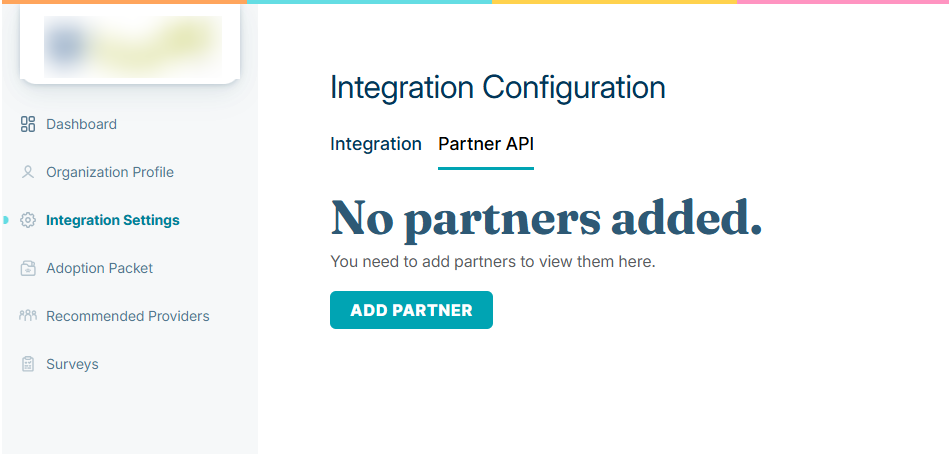
- Navigate to the Integration Settings section. Click on the Partner API tab. Click Add Partner.
-
From the Brand Name dropdown, select Hill's Pet Nutrition, Inc
-
In Brand Shelter ID, enter the numeric ID assigned to your shelter by Hill's. You can find this in your Hills program dashboard or in the Hills welcome email. Click Validate. Petszel will call the Hill’s API:
-
-
Success ➜ You can move on to consent setup.
-
Failure ➜ Error message shows the reason; correct the entries and retry.
-
Tip: You may need to click into a checkbox in the section below to see the validation response.
2. Choose How Your Shelter Captures Consent
Select your current method of consent for the Hill's Food Shelter Love Program (their script). As part of this you are accepting that you are submitting data in accordance with Hill's privacy policy. Click Save.
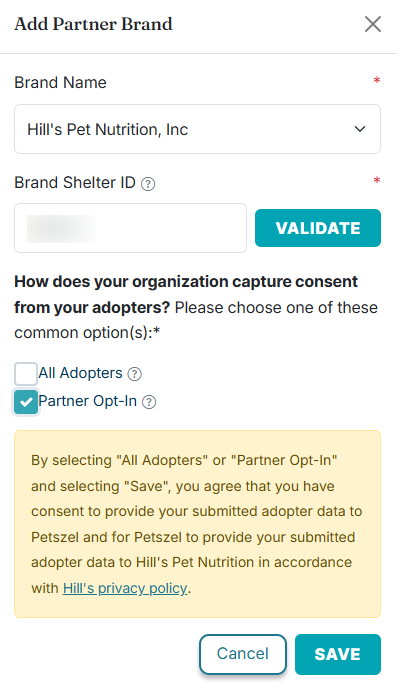
Prompt shown on screen:
“How does your organization capture consent from your adopters? Please choose one of these common option(s):”
| Option | When to choose it |
|---|---|
| Partner-Specific Opt-In | You ask adopters to tick a box saying they specifically want messages from Hill’s |
| General Partner Opt-In (Chameleon-only) | You offer a single checkbox for all partners opt-in (Hill’s, Petszel, etc.) |
| Send All | Your adoption agreement already includes adopter consent for sharing their information with Hill’s. |
Dynamic display
Only the options your shelter software supports are shown automatically if they do not reflect how you currently do consent please contact support@petszel.com
3. Submit & Finish
Click Submit to save. You’ll see a confirmation banner, and the Partner API tab will stay active. Your Hill’s FSL reports will now flow automatically on your next adoption sync.
Need help?
Email support@petszel.com or use in-app chat. We’re happy to walk you through credential validation or consent best practices.